GoHighLevel snapshots can carry selected assets from a source sub-account into client sub-accounts. The important operational distinction is asset ownership. When an update includes an asset originally linked to the snapshot, HighLevel can overwrite that asset with the refreshed version; client edits to the linked asset may be lost. A folder name does not create an override boundary. Safe distribution depends on selective pushes, duplicated client-owned assets, release evidence, and a tested recovery plan.
Distinguish loading from pushing an update
Loading a snapshot into an existing account is an import flow where selected assets are added and conflicts can be reviewed. Pushing an update sends refreshed assets to sub-accounts that previously loaded the snapshot. HighLevel lets the agency select accounts and assets for a push; it is not necessary to resend every item. However, an included snapshot-linked workflow or campaign can be overwritten, so selection is the primary change-control boundary.
Separate release units by ownership and change cadence
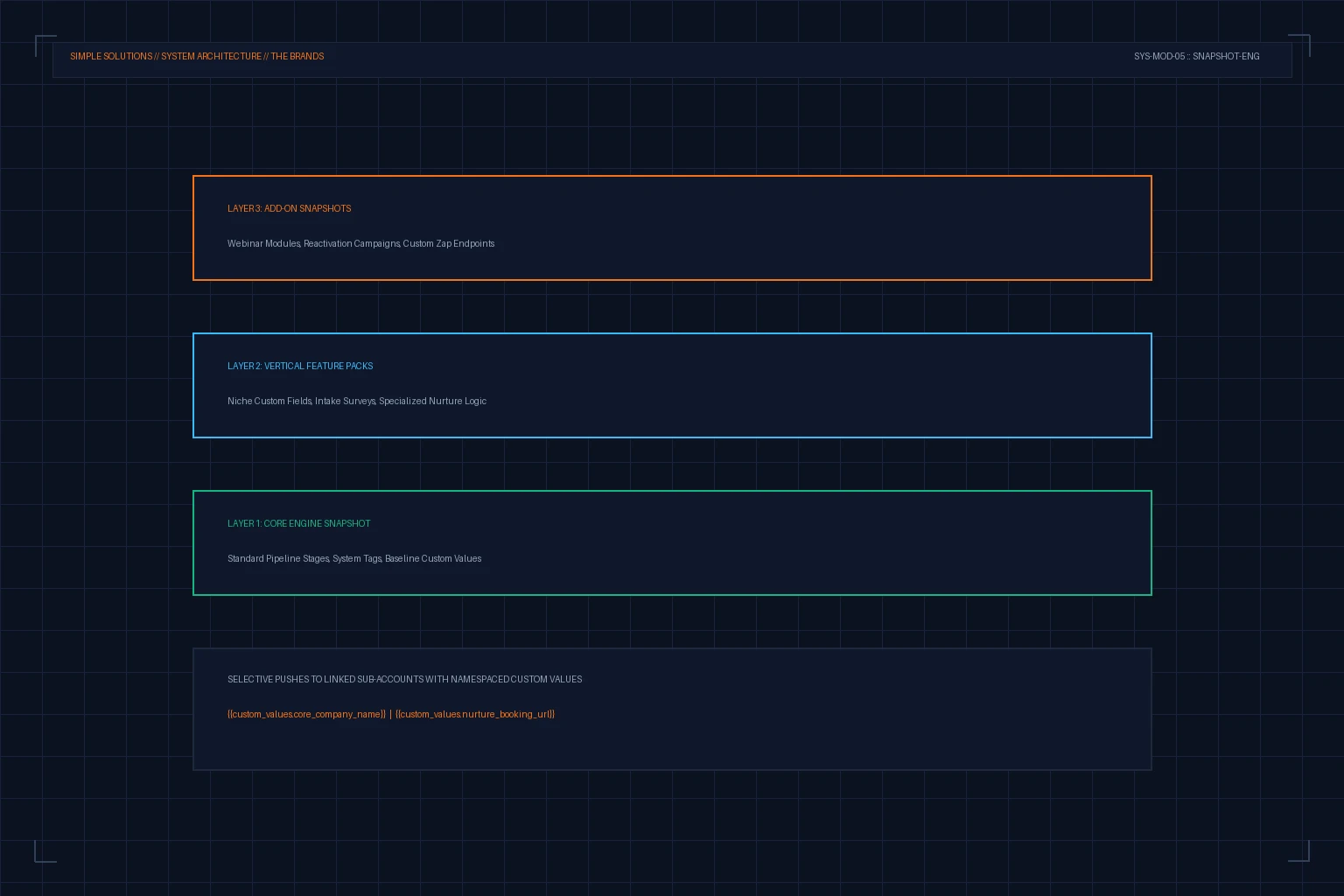
Use a stable core release for governed fields, tags, pipeline definitions, and shared routing; a vertical release for industry-specific forms and messaging; and optional releases for features with independent adoption. The layers are an agency convention, not a platform isolation guarantee. Keep a manifest listing each asset, owning release, source account, dependencies, client-customization policy, and rollback method.
Selective push is deployment control; explicit asset ownership is customization control. A naming convention helps people, but it does not change overwrite behavior.
Protect client customizations with copies, not folders
HighLevel's documented protection pattern is to duplicate a snapshot-originated item before the client customizes it. The copy is not tracked as the linked snapshot asset, but connected workflows must be updated to reference the copy. Record this fork in the account manifest. A custom folder can improve navigation and governance, yet it does not by itself prevent an included linked asset from being replaced during a push.
Use custom values for tenant configuration
Keep account-specific company details, booking links, escalation numbers, and approved copy fragments in clearly namespaced Custom Values rather than embedding them repeatedly in workflows. HighLevel documents that push updates do not edit or delete Custom Values, which makes them a useful tenant-configuration boundary. Still validate every required value before activating workflows and avoid assuming a missing value will fail safely.
Refresh, diff, stage, and canary every release
Update the governed source sub-account, refresh the snapshot, and record exactly which assets changed. Push first to a staging account that contains realistic local copies and integrations. Then canary one low-risk production account, inspect workflow enrollment, triggers, messages, forms, custom-value resolution, and execution logs, and only then expand the account selection. Pause between waves so failures are visible before the next group receives the change.
Plan rollback at the asset level
Before a push, export or duplicate critical current assets and capture their references, active state, and dependencies. Define rollback as a concrete operation: disable the changed workflow, restore the prior copy, repair downstream references, and reconcile contacts that entered during the incident window. A snapshot refresh is not a source-control history, so keep release notes and recovery copies outside the production asset itself.
Onboard a client inside the snapshot model, not beside it
The release model only protects client work if the client account begins in the governed state. A disciplined onboarding sequence loads the core and vertical releases in order, applies the account manifest template, configures the client-owned values, and forks any asset the client will customize before they touch the linked original. The fork order matters: duplicate the linked workflow or campaign first, point every connecting reference at the copy, and only then hand the copy to the client, because a fork performed after a first customization requires reconstructing what the client changed. Record the fork in the manifest with the copy name and the reason, so a future selective push cannot silently restore the governed version over the customized one. Clients who joined before the snapshot discipline existed can be retrofitted by exporting their current workflows, rebuilding them as documented copies, verifying behavior side by side, and then switching references once the duplicate behaves identically.
Make the conflict decision explicit instead of accidental
Every linked asset eventually faces three fates under push updates: keep the governed version, keep the client copy, or merge by rebuilding. The decision should follow a rule, not the order of operations. When the agency changes governed logic such as qualification fields, routing, or compliance steps, the governed version wins and the client copy must be updated deliberately, because leaving it behind creates a divergent workflow that no longer reflects the release. When the client changed cosmetic or copy aspects, the client copy wins and the agency change is applied to the copy as an update rather than a push. When both changed meaningfully, merge by rebuilding: take the new governed logic and reapply the client customizations on top, then re-test. Log each decision against the asset in the ledger; without that log, a year of mixed decisions produces a fleet of sub-accounts where nobody can say which version of any workflow is authoritative, and the next agency-wide release becomes a coin toss per client.
Verify the destination instead of trusting the push notification
For each wave, confirm that selected accounts received only the intended assets, client-owned copies remain unchanged, Custom Values still resolve, workflow status is correct, and test records traverse the expected branch. Review execution logs for removed steps or unexpected enrollments. Maintain an account-by-account deployment ledger with release version, timestamp, operator, result, exceptions, and rollback status.